Setelah tanya sama eyang gugel ane nemu kaya gini nih, dan ane mau ngeshare cara ini ke bloggers semua, barangkali aja berguna, hehehe.. yukk cekidooot
Buka Terminal : (ctrl+alt+T) : menu > administration > terminal
backup dulu file sysctl.conf, caranya “sudo cp /etc/sysctl.conf /etc/sysctl.conf.backup” (tanpa petik), jadi kalo ada eror hasil backupannya di sysctl.conf.backup
edit file sysctl.conf : “sudo gedit /etc/sysctl.conf” (tanpa petik) untuk editornya bisa make nano, gedit, leafpad/dll
tambahin kode ajaib ini di akhir file yang di edit tadi :—————————————————————————————————————
increase TCP max buffer size setable using setsockopt()
net.core.rmem_max = 16777216 net.core.wmem_max = 16777216
increase linux autotuning TCP buffer limits
min, default, and max number of bytes to use
set max to at least 4MB, or higher if you use very high BDP paths
net.ipv4.tcp_rmem = 4096 87380 16777216 net.ipv4.tcp_wmem = 4096 65536 16777216
don’t cache ssthresh from previous connection
net.ipv4.tcp_no_metrics_save = 1 net.ipv4.tcp_moderate_rcvbuf = 1
recommended to increase this for 1000 BT or higher
net.core.netdev_max_backlog = 2500
for 10 GigE, use this, uncomment below
net.core.netdev_max_backlog = 30000
Turn off timestamps if you’re on a gigabit or very busy network
Having it off is one less thing the IP stack needs to work on
#net.ipv4.tcp_timestamps = 0
disable tcp selective acknowledgements.
net.ipv4.tcp_sack = 0 #enable window scaling net.ipv4.tcp_window_scaling = 1 ——————————————————————————————————
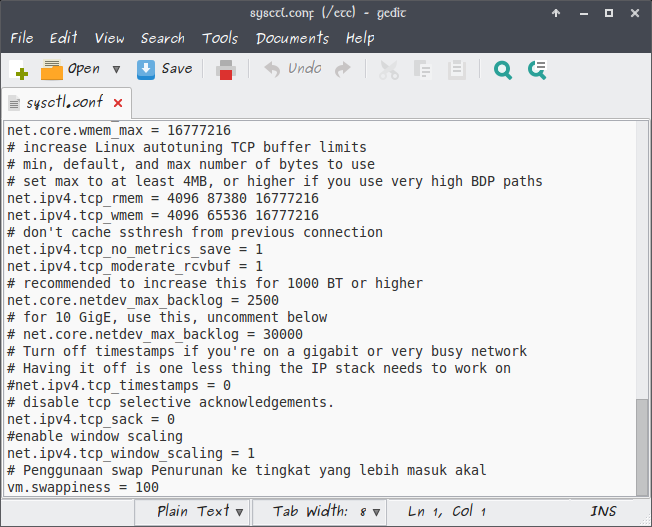
simpan file (ctrl+s)
masukin perintah “sudo sysctl -p” (tanpa petik)
silahkan surfing di internet lagi,, rasakan bedanya.
Kalo mau ngembaliin lagi, hapus aja file yang di tambahin